[Unity asset · Asset Store · Coming soon]
Data Table for Unity
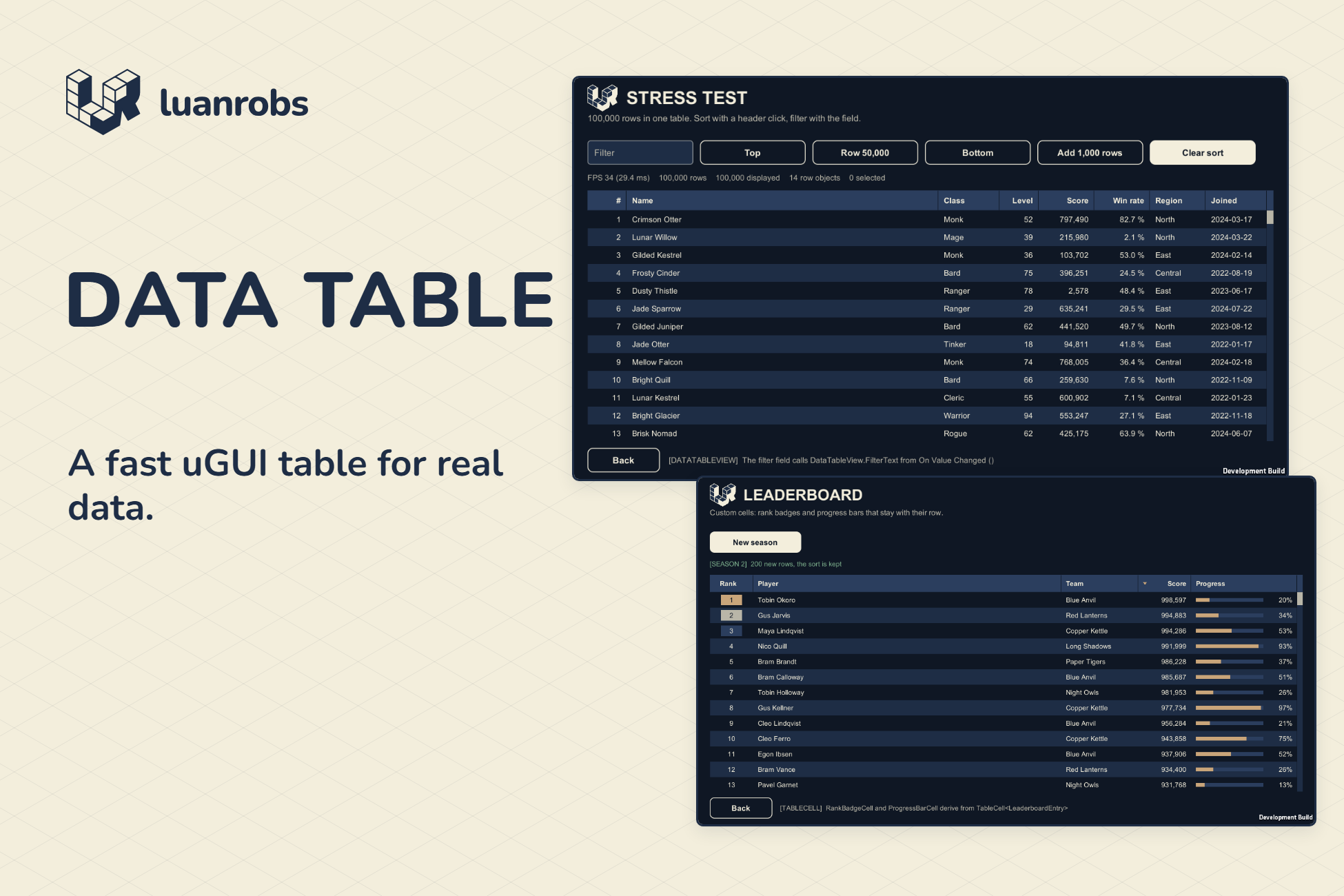
A table for Unity UI (uGUI) that stays smooth with a hundred thousand rows: give a DataTableView a list and a few column definitions and get a scrolling, sortable, filterable, selectable table with a fixed header.
Unity 6000.0.84f1+
This opens your email app. If nothing opens, write to luanrobs@gmail.com. I will reply once, on launch day. I will not add you to a list.
QUICK START
using System.Collections.Generic;
using Luanrobs.DataTable;
using UnityEngine;

public sealed class Player
{
    public string Name;
    public int Score;
}

public class PlayersTable : MonoBehaviour
{
    [SerializeField] private DataTableView table;

    private TableData<Player> data;

    private void Start()
    {
        List<Player> players = new List<Player>
        {
            new Player { Name = "Amber Falcon", Score = 4200 },
            new Player { Name = "Copper Anvil", Score = 3100 },
            new Player { Name = "Violet Lantern", Score = 5800 },
        };

        data = table.SetData(players, new[]
        {
            new TableColumn<Player>("Name", p => p.Name) { Width = 220f, Flex = 1f },
            new TableColumn<Player>("Score", p => p.Score, "N0") { Width = 100f },
        });

        table.RowClicked += rowIndex => Debug.Log(data[rowIndex].Name);
    }
}
TESTED ON
| Platform | Status |
|---|---|
| Windows Editor and players, Unity 6000.3.12f1 | All 354 EditMode tests pass. In Windows 11 players built with Mono and with IL2CPP, a test driver walked the five demo scenes, sorted, filtered, selected, resized and scrolled 100,000 rows, and passed, with legacy Text and with TextMeshPro. |
| New projects, Unity 6000.3.12f1 and 6000.0.84f1 | With the package installed from its .tgz file and the Demo sample imported: 348 EditMode tests passed and 6 were skipped (TextMeshPro cases that need the TMP Essential Resources), the sample scenes opened with no missing scripts, and the test driver passed in a Windows player. With Domain Reload disabled, three Play sessions in a row gave the same results. |
| Android (IL2CPP) | x86_64 emulators only: the test driver passed on API 36 (Unity 6000.3.12f1 build) and on API 24 and 25 (Unity 6000.0.84f1 build). Frame times on the emulators are not representative of a device. |
| URP, and a project with only the Input System | Not run. |
| Other platforms (macOS, Linux, iOS, WebGL and the rest) | not run |
Tested with version 1.0.0
WHAT IT DOES NOT DO
uGUI only. For UI Toolkit, use Unity's
MultiColumnListView.Not included: in-cell editing, column reordering by dragging, grouping and tree rows, pinned (frozen) columns, pagination controls, data binding to databases or web services, sorting by more than one column, variable row heights, an Edit mode preview and elastic overscroll.
All rows have the same height (
rowHeightin the style). KeeprowHeightat leastfontSize * 1.3or legacy text can disappear.Legacy Text cuts a text that does not fit at a word boundary, with no ellipsis. TextMeshPro shows an ellipsis.
The table builds its child objects in Play mode only; in Edit mode it is an empty rectangle.
WHAT IS IN THE PACKAGE
C# source of the runtime, with EditMode tests.
The demo sample: five scenes.
The manual, as Markdown.
Unity built-in modules used: UI and IMGUI. uGUI and TextMeshPro come from
com.unity.ugui.There is no native code, shader, font, image or third-party code in the package itself.
SUPPORT
I answer the support email myself, in English or Portuguese: luanrobs@gmail.com
To reproduce a problem I need: Unity version, package version, platform and OS version, the Console log, and the steps to reproduce it.
Purchases, licenses and refunds are handled by the Unity Asset Store.
HOW IT WAS BUILT
This package was developed with the assistance of generative AI tools.
The code, the tests, the documentation and the sample content were generated with Claude (through Claude Code) under my direction, then run and tested as listed under "What was tested".
luanrobs is one developer: me. If something doesn't work for you, email me and I'll do my best to fix it.
CHANGELOG
1.0.0 · 2026-10-20
DataTableView(uGUI, Add Component > luanrobs > Data Table View): a scrolling table with a fixed header. Rows are virtualised: only the rows the window can show have GameObjects, so the number of row objects depends on the height of the table, not on the number of rows.SetDatatakes a list of rows and a list ofTableColumn<TRow>and returns aTableData<TRow>handle. Columns are declared with typed delegates; the package never uses reflection on your types.- Three column constructors: text (sortable, case-insensitive ordinal compare), number (right-aligned, numeric sort, invariant-culture format string, cached text) and custom cell (
TableCell<TRow>). Column properties:Width,MinWidth,Flex,Alignment,Resizable,Searchable,CacheText,Compare.