On Click ()
No code at all: drag the PDF into a Button's On Click () list and pick PdfAsset > Open ().
[Unity asset · Asset Store · Coming soon]
Drop. Reference. Open.
Drop a PDF into your Unity project, point a Button at it, and it opens: in a native full-screen viewer on Android, in a viewer drawn over your game on Windows.
Unity 6000.0.84f1+ · Android API 23+ (25+ with Unity 6000.3) · Windows 10/11 x64 · iOS: not supported in this version
This opens your email app. If nothing opens, write to luanrobs@gmail.com. I will reply once, on launch day. I will not add you to a list.
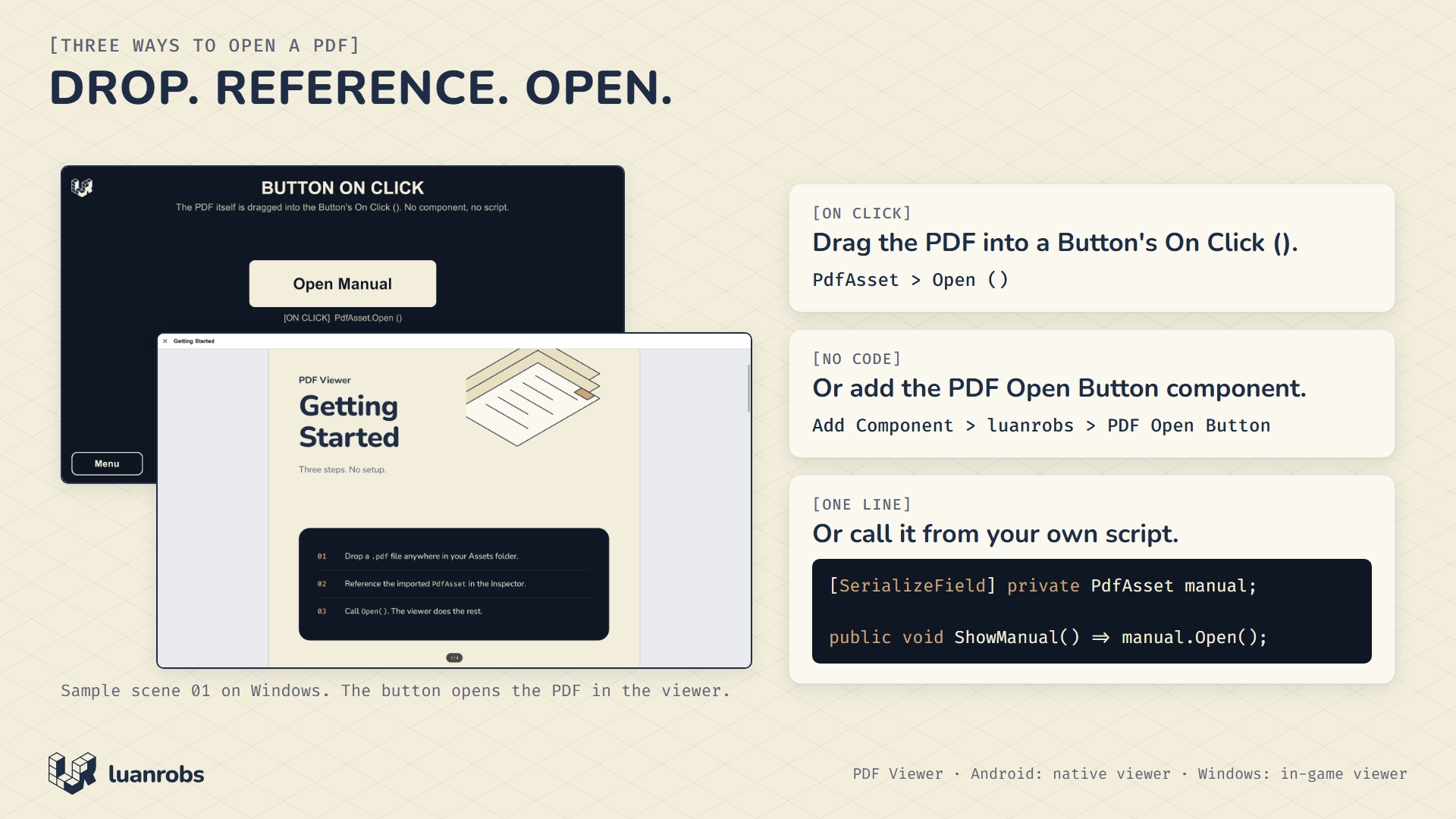
No code at all: drag the PDF into a Button's On Click () list and pick PdfAsset > Open ().
Add the component to a UI Button and assign the PDF. Use it when each button needs its own viewer options.
manual.Open(); on a field declared as [SerializeField] private PdfAsset manual;
using Luanrobs.Pdf;
using UnityEngine;

public class ManualButton : MonoBehaviour
{
    [SerializeField] private PdfAsset manual;

    public void ShowManual()
    {
        manual.Open();
    }
}You want to show a manual, a catalog, terms or a report full-screen, or put its pages in your own UI as textures, on Android or Windows, without adding a PDF library to your build.
You need iOS or WebGL today. You need page textures on macOS or Linux. You need text selection, links or search. Your PDFs are password-protected, or users must fill in forms.
| Platform | What happens | Events |
|---|---|---|
| Android (API 23+; API 25+ with Unity 6000.3) | Native full-screen viewer. | Delivered when the player returns to the game. |
| Windows 10/11 x64, Standalone player | In-game full-screen viewer. | Delivered live. |
| Windows Editor, Play mode | In-game full-screen viewer in the Game view. | Delivered live. |
| Editor outside Play mode | Opens the system PDF app (fallback). | Opened and Closed fire immediately. |
| macOS, Linux | Opens the system PDF app (fallback). | Opened and Closed fire immediately. |
| iOS | Not supported in this version. A native iOS viewer is planned. | - |
| WebGL | Not supported in this version. | - |
Page rendering to textures: Android and Windows only. The viewer is full-screen; to put a page in your own UI or on a 3D surface, render it into a texture with PdfDocument or PDF Page Image. On macOS, Linux, iOS and WebGL PdfDocument.IsSupported is false and loading a document fails with a message. See Rendering pages to textures.
No text selection, no links, no search. The viewer shows every page as an image. Text cannot be selected or copied, links inside the PDF cannot be clicked, and there is no search. This is the same in the Android viewer, in the Windows viewer and in the pages rendered with PdfDocument.
Page textures have no mipmaps, cannot be read back with GetPixels and are at most 4096 pixels per side. Rendered pages are plain images: no text selection and no links.
One viewer at a time. On Android and Windows, an open call made while a viewer is open is ignored and raises PdfViewer.Error.
Password-protected PDFs are not supported. Opening one raises PdfViewer.Error, and a PdfDocument fails to load it with a message in Error. On Windows, every PDF encrypted with AES-256 is rejected the same way, even without a user password. PDFs that only carry an owner (permissions) password with RC4 or AES-128 encryption open on Windows.
Android: the viewer cannot be closed from code while it is on screen. Unity is paused behind it. See Closing the viewer.
Built-in viewers on Android and Windows only. macOS, Linux and the Editor outside Play mode open the system PDF app, ignore viewer options and cannot report page changes.
Windows: no gamepad control. The viewer is operated with mouse, keyboard or touch. In a gamepad-only game, close it from code with PdfViewer.Close().
Full source: C#, Java (Android) and C++ (the Windows DLL, with a build script).
Rendering uses the PDF engines built into Android and Windows, so there is no third-party library on any platform.
An Android build gets no native .so library, so Google Play's 16 KB page size requirement doesn't affect it.
You don't add Gradle templates or edit the manifest, and the Android library declares no permissions.
Eight sample scenes, three sample PDFs, editor tests and a full manual.
Works with domain reload disabled.
Android emulators: API 36 (build made by Unity 6000.3) and API 29, 26, 24 and 23 (build made by Unity 6000.0). The automated check passed on all five. The viewer events, page rendering (also with rotated and cropped pages) and the two Android fixes were checked: no repeated page report after Android recreates the viewer, and no skipped page number when the screen stalls during a fling. The stall was simulated, because rotating an emulator during a fling never caused the skip.
Samsung Galaxy S23 (Android 16): one automated check, and scrolling, flings and the scene 07 buttons with taps and swipes sent through adb. Pinch zoom and rotating the phone while reading were also tried by hand and worked (not logged or measured).
Windows 11 x64: three Mono players run without sending input (Unity 6000.3.12f1 with Direct3D 12 and the Input System package, Unity 6000.0.84f1 with Direct3D 11 and the legacy Input Manager, and Unity 6000.3.12f1 in a new project) passed an automated check of the viewer, PdfDocument, night mode, the runtime object names and the eight demo scenes. In the Editor, PDF Page Image ran in Play mode and demo scene 07 ran in two Play sessions in a row with Domain Reload disabled.
506 EditMode tests pass on Unity 6000.3.12f1 in the development project, and in two new projects on Unity 6000.0.84f1 and 6000.3.12f1 that installed the package from its .tgz file. No other Unity release was tested.
On Android, API 25, 27, 28 and 30 to 35, low-memory devices, scene 07 in landscape, PDF Page Image, and PdfDocument.Load(bytes), LoadFile and LoadStreamingAsset (only Load(PdfAsset) ran there). On Windows, Windows 10, mouse, keyboard and touch input in the players of this version, high-DPI scaling and IL2CPP players. Also HDRP, a project without com.unity.ugui beyond the compile check and the tests above, macOS and Linux, Addressables and AssetBundles, and PDFs with forms or annotations.
Tested with version 1.0.0
No. iOS is not supported in this version. Calls do not show the document there, although Opened and Closed still fire right away. A native iOS viewer is planned.
Yes, on Android and Windows. Render the page into a texture with PdfDocument, or use the PDF Page Image component to show a page in a RawImage without code. See Rendering pages to textures and PDF Page Image (no code). The viewer itself is always full-screen. On macOS, Linux, iOS and WebGL page rendering is not available.
The Android library declares one Activity and no permissions. It uses only Android platform APIs and adds no SDK. OpenUrl uses Unity's networking, which needs the standard INTERNET permission; Unity adds it automatically.
A Windows build gets one extra file, LuanrobsPdf.dll (about 200 KB). It uses only Windows platform APIs, contains no third-party library and needs no installer or redistributable. Microsoft's C/C++ runtime and C++/WinRT code are compiled into it; see Third-Party Notices.txt.
The viewers do not use the render pipeline. The Android viewer is a native screen. The Windows viewer is rendered with IMGUI on top of the frame. Tested with Built-in and URP. HDRP was not tested.
The Windows viewer reads input through the Input System package when it is installed and active, otherwise through the legacy Input Manager.
PDF bytes are stored inside each PdfAsset and loaded with whatever references it. See Memory notes.
Full C# source. The Android side ships as Java source that Gradle compiles when you build. The Windows side is one small DLL whose C++ source is included.
I answer the support email myself, in English or Portuguese: luanrobs@gmail.com
To reproduce a problem I need: Unity version, package version, platform and OS version, the Console log, and the steps to reproduce it.
Purchases, licenses and refunds are handled by the Unity Asset Store.
I started this plugin because I needed it. I was building an air suspension control app in Unity and had to show the suspension's manual, a PDF, inside the app. I wanted that PDF to behave like any other asset: drag it in, assign it in the Inspector, call Open(). That is how the package works, and that app's manual opens in my own viewer.
This package was developed with the assistance of generative AI tools.
The code, the tests, the documentation and the sample content were generated with Claude (through Claude Code) under my direction, then run and tested as listed under "What was tested".
luanrobs is one developer: me. If something doesn't work for you, email me and I'll do my best to fix it.
1.0.0 · 2026-10-12
.pdf file in the project into a PdfAsset, with file size and page count shown in the Inspector. The scripting define LUANROBS_PDF_IMPORTER_OPT_IN makes the importer opt-in per file when another package also imports .pdf files..pdf is selected, with previous and next buttons.PdfAsset.Open() and PdfAsset.Open(PdfViewerOptions) to open a PDF with one call. PdfAsset.Open() can be picked directly in a Button's On Click () list or any other UnityEvent, with no component and no script.