[Unity asset · Asset Store · Coming soon]

Home Screen Kit for Android

Put your game on the Android home screen. Home Screen Kit for Android lets you define home-screen widgets, launcher shortcuts and Quick Settings tiles in C# and the Unity Editor, update them from your game, and receive every tap in one C# event.

Unity 6000.0.84f1+ · Android 8.0 (API 26)+

This opens your email app. If nothing opens, write to luanrobs@gmail.com. I will reply once, on launch day. I will not add you to a list.

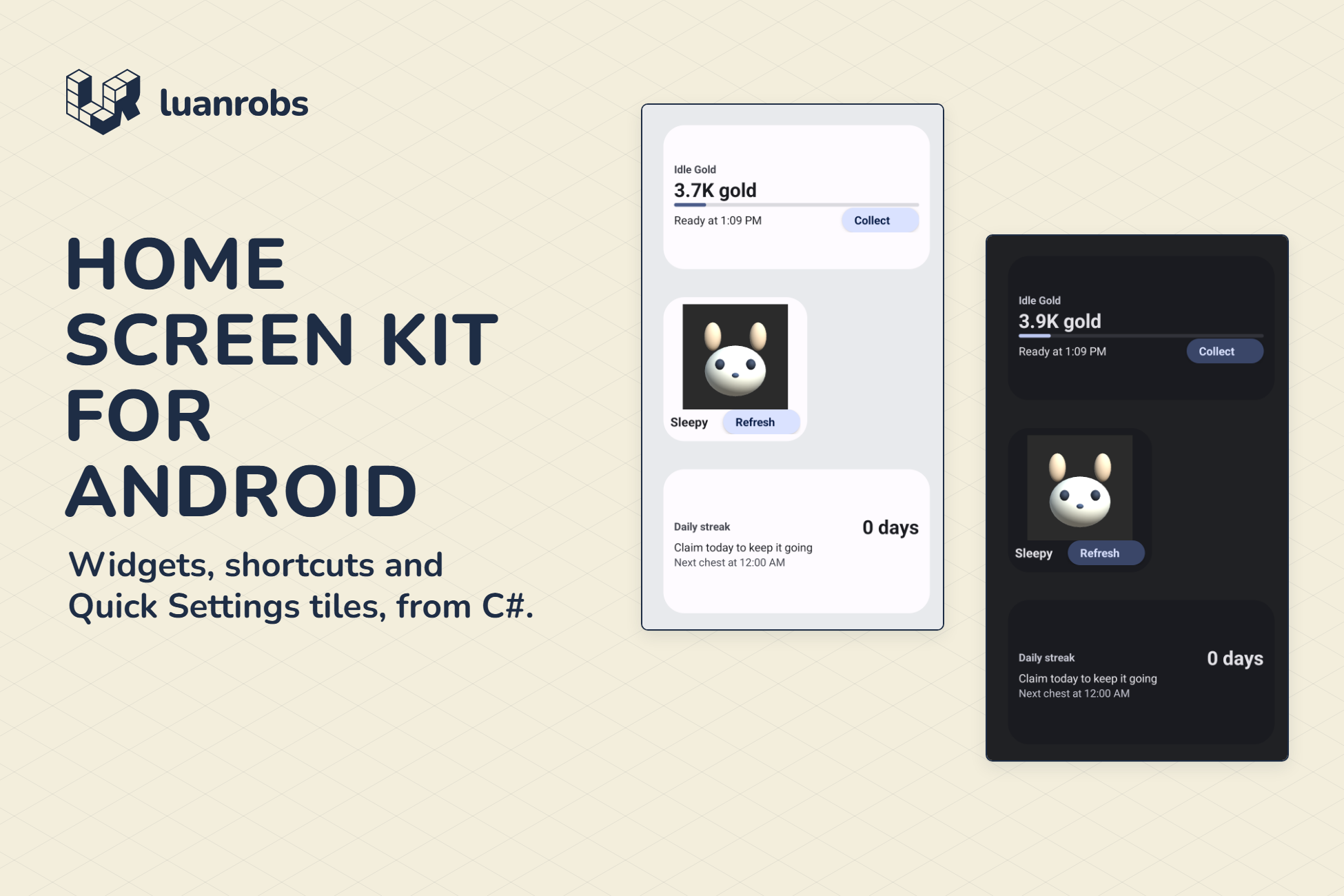
Cover of Home Screen Kit for Android, with screens of the demo

OVERVIEW

Widgets that keep updating while the game is closed

Push text, numbers, progress bars, countdowns, stopwatches, clocks, a regenerating counter, a timeline of future states and Texture2D or RenderTexture snapshots. The launcher ticks countdowns and clocks by itself. Counters and timelines are applied by inexact alarms, so they can be late (measured figures are in the manual).

Launcher shortcuts

Static shortcuts declared in an asset, dynamic shortcuts set at run time and pinned shortcuts requested from the player.

Quick Settings tiles

Up to four tiles with a state, label and subtitle you set from C#, and the Android 13+ prompt that offers to add a tile.

One event for every tap

HomeScreenKit.Activated fires for a widget element, a shortcut or a tile, also when the tap started the game, with Activity and GameActivity.

Editor tools

A widget preview window, a simulator so your code runs in Play mode, and a validator with 34 stable rule ids that runs before the build.

No project setup

At build time the package writes the receivers, services, layouts and manifest entries into its own Android library. Your project's manifest isn't edited, and Unity's Gradle build compiles the Java source. There is no AndroidX, Kotlin or third-party code, and no server or account behind it.

QUICK START

using System;
using Luanrobs.HomeScreen;

gold.SetCounter("gold", new HomeCounter(1240, 0.5, 5000, DateTime.UtcNow)).Publish();
HomeScreenKit.Activated += a => { if (a.Action == "collect") OpenCollect(a.Payload); };

TESTED ON

What Result
Unity 6000.3.12f1 and 6000.0.84f1, on Windows All 318 EditMode and 12 PlayMode tests pass on both, also in new projects that installed the package from its .tgz file with the Demo sample
Android 8.0 (API 26), Android 10 (API 29) and Android 16 (API 36.1) emulators, x86_64, IL2CPP All 13 device scenarios passed
Samsung Galaxy S23, Android 16, IL2CPP ARM64 and Mono ARMv7 The scenarios that ran passed, including GameActivity and the Mono ARMv7 build, with two exceptions: a timeline update while the game was closed did not arrive with Battery saver on, and the static shortcut launch was checked only as far as the shortcut list
Android 7.1 (API 25) and Android 6.0 (API 23) emulators The package does nothing and the game does not crash

The widgets were drawn in a test host app on these devices, not in the Pixel Launcher, One UI or other launchers' widget pickers. Not verified: real launcher pickers, Doze, a phone reboot, Material You colours, and the Widget Preview window. The full list is in the manual.

Tested with version 1.0.0

WHAT IT DOES NOT DO

  • Android 8.0 (API 26) and newer only. Below that, every call returns Unsupported. There is no iOS version: it needs WidgetKit, and no Mac was available to build or test it.

  • A widget shows data, not a running game. It cannot run a scene, animate, play video or sound, scroll a list or take text input.

  • Counters and timelines are applied by inexact alarms, so Battery saver and manufacturer battery managers can delay or hold them back.

  • Colours are fixed in the widget definition, labels are not localized in 1.0, and a widget has one layout for all sizes.

  • Launchers differ in sizes, pickers and pin dialogs, and the widgets were not run in a real launcher's picker.

Full list in the manual

SUPPORT

I answer the support email myself, in English or Portuguese: luanrobs@gmail.com

To reproduce a problem I need: Unity version, package version, platform and OS version, the Console log, and the steps to reproduce it.

Purchases, licenses and refunds are handled by the Unity Asset Store.

HOW IT WAS BUILT

Home-screen widgets were my first idea for this kit, and people have been asking on the Unity forums how to make one since 2012.

This package was developed with the assistance of generative AI tools.

The code, the tests, the documentation and the sample content were generated with Claude (through Claude Code) under my direction, then run and tested as listed under "What was tested".

luanrobs is one developer: me. If something doesn't work for you, email me and I'll do my best to fix it.

CHANGELOG

1.0.0 · Unreleased

  • Widgets: HomeWidget assets with an element tree (Stack, Row, Column, Text, Number, Button, Image, Progress, Chronometer, Clock, Spacer), cell sizes, resize modes, preview image, light and dark colours and Material You system colours on Android 12+. Up to 16 widgets, 40 elements per widget, depth 6.
  • Run-time setters on HomeWidget: SetText, SetNumber, SetCounter, SetProgress, SetImage (Texture2D, RenderTexture or PNG bytes), SetCountdown, SetStopwatch, SetVisible, SetPayload, SetTimeline, then Publish, PublishAsync or HomeWidgets.PublishAll. Results arrive in HomeWidgets.Published.
  • HomeCounter: a number that grows while the game is closed, with a cap and a refresh interval. Number formatting (decimals, grouping, K/M/B/T abbreviation, prefix, suffix) runs in the device locale and gives the same result in C# and in Java.

Full changelog